FAQ Category: Using Love VoIP

Outbound Call Costs & Bundles

Once you have set up your account, you will be able to receive inbound calls from your voip users /extensions. Please note, our trial accounts are for inbound calling only

After the free trial period, each VoIP user will get a bundle of 100 free minutes to use to call UK landlines, mobiles and also some international destinations.  If you have exhausted your free bundle, then calls made to a UK landline cost 1.5p per minute, and a UK mobile is 7p per minute. You can also upgrade your VoIP user to have an unlimited outbound call bundle at a cost of just £7 per month.

For full up-to-date pricing for international destinations, rates can be found on our pricing page.

Number Formatting for outbound calls

When you dial out using VoIP/SIP, the call is currently formatted to originate from the area that your virtual number originates. This means that calls made outbound are formatted in the format of a UK local call.

An example of this is as follows-

UK (0044) 03333 444211

dials as 03333444211 or 00443333444211

South Africa (0027) – Mobile 0731234567 or +27731234567

dials as 0027731234567

You DO NOT use the + when calling out, instead use 00 then the country code, and also remove the first 0 if you have one.

What is VoIP?

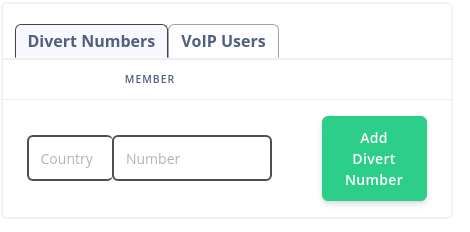
VoIP (also known as SIP) allows you to carry a call over the internet connection of your VoIP device, which can be an app on your mobile/tablet/PC/laptop, or using an existing VoIP handset or ATA box.

For example, many users install a free VoIP app and use this on a mobile device. This acts like the normal phone dialler, but works over your devices internet connection or wifi.

Using this app on your mobile you can receive calls FREE as well as make outbound calls that display your virtual phone number as the caller ID, and any calls made come out of your credit balance on your account with us. Your mobile network operator (EE, o2, Voda etc) will not see the call so cannot bill this.

With VoIP you can do the following-

– Receive calls FREE* (anywhere you have an internet connection)

– Make outbound calls

– Display your virtual number as your outbound caller ID

– Add more VoIP users at £4 per month includes a bundle of 100 free minutes for outbound calls

– Distribute inbound calls across VoIP users

– Call other VoIP users free

*if you are using a virtual 080 freephone number then calls will cost 7.5p per minute

What is a Call Whisper?

Call Whisper is a fantastic service which you can use to identify your incoming calls.  Your call whisper can be completely customised and will play a short message to you (not the caller) prior to the call being connected.  This is great if you have multiple phone numbers and you need to distinguish which phone number was rung or which menu option the caller selected.

Call whispers are added onto your call group.  To add a call whisper follow the below instructions

  1. Firstly create your call whisper.  From the Dashboard click on “My Media”What is a Call Whisper?
  1. Then click on “Create new media”What is a Call Whisper?
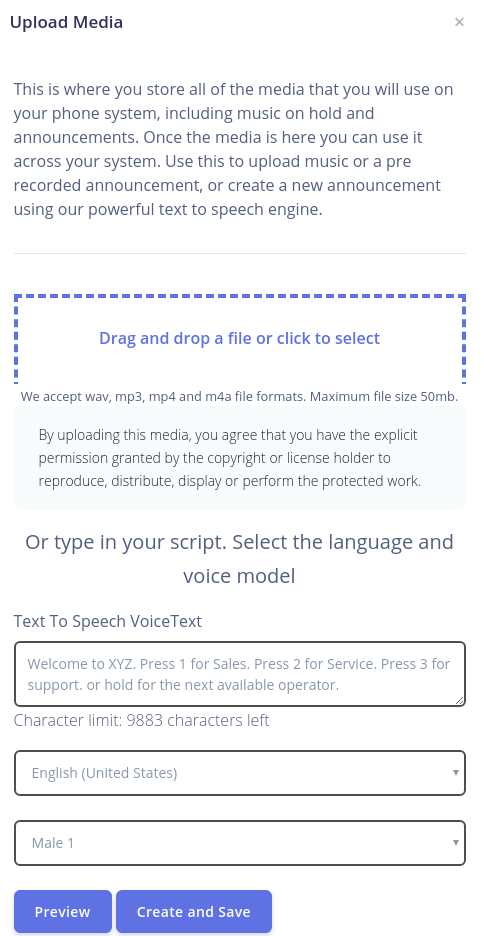
  2. Here you can upload your own custom media, or you can type in your script into the Text to speech boxes.  You can also choose the language and voice model which you want – Click Preview to ensure you are happy and then click “Create & save”
What is a Call Whisper?
  1. Now you have created your media you need to assign it to your call group. From the dashboard go to “Call forwarding Groups”
What is a Call Whisper?
  1. Then find the group which you would like to attach the whisper to and click on the “Edit” button in the top right cornerWhat is a Call Whisper?
  2. Next select the option “Call whisper”What is a Call Whisper?
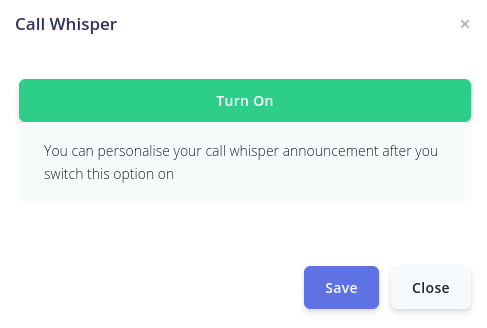
  3. Click “Turn on” to activate the serviceWhat is a Call Whisper?
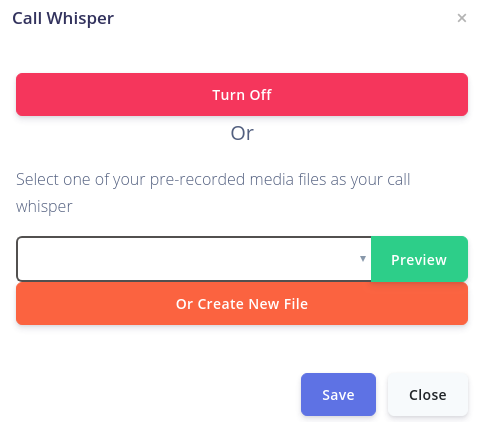
  4. Then use the dropdown box to add your media file & click “Save”What is a Call Whisper?
  5. Your call whisper will be activated and ready to use

Please note – Call whispers are added onto call groups, if you are looking to use this feature to tell which number or menu option is used then each number or menu option will need to have their own call group.  Call groups can be added or removed anytime.

Calls from Withheld numbers

We automatically set your telephone numbers to block calls from withheld numbers.  If you would prefer to accept these calls then you can change this setting via the customer portal

  1. From Dashboard go to “My Numbers”
  2. Find the number you wish to manage and click on “manage my number”
  3. Scroll down to “reject calls from withheld numbers” and Click on “OK” to disable this

Registration line & nuisance call blocking

We have automated systems that identify both registration and nuisance calls.

Registration calls are automated inbound calls generated by a user in order to attempt to register for a service like whatsapp, Ebay, Amazon, Stripe, Facebook and so on.

These services require a landline telephone number in order to register, and play back a code over the phone that the user can use to manually register their account.

When our systems identify inbound calls from registration numbers then these are automatically blocked, so these numbers can never call any of our customers again.

Nuisance calls are identified in a similar way, and when our systems identify these we automatically blacklist these in the same way, so that these numbers are unable to call our numbers.

If you wish to block a call yourself then you can access CALL BLOCKING features via the dashboard, which allows you to block entire number ranges, even countries on both inbound and outbound calls.

If you would like any further information on our call blocking then please contact our customer services team using our chat facility, or raise a support ticket via our website.

How is Love VoIP low cost?

Love VoIP is operated by UK Telecoms company  IP Voice Networks (IPVN), which is a UK based Ofcom Registered Telecoms Network.

IPVN owns and operates its own network, we don’t resell other people’s services.  We own around 1 million Ofcom allocated virtual phone numbers for the UK market, but also have similar numbering arrangements in over 60 countries worldwide, and supply virtual telephone numbers and VoIP services to local markets across the globe.

IPVN has customers on every continent, and distributes telecoms services globally via different brands.

Dealing directly with a global telecoms network means that you avoid resellers and middle men, getting the products and services directly from the source.

We aim to provide the best possible products and services to the widest possible audience at the lowest possible price using our highly efficient, simple, self service offerings.

Can I have more than one number?

Yes, you can have as many telephone numbers as you need.  Your first standard number with us is free and any additional numbers  are chargeable. Additional numbers are added via your customer portal after you have created your account