From the main dashboard screen click on “Call groups”
Then select the group you wish to change and click the purple “edit” button in the top right corner
Next, select the top option “Forward calls to”
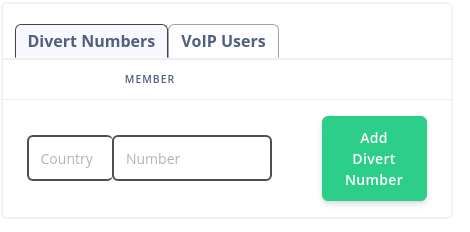
You will then be presented with a top up – this is where you can add divert numbers (landline or mobile numbers) or add voip users into your call group
Simply enter the number you wish to forward to (including country code) into the divert numbers section, or click on the “voip users” tab to include voip users into the call group. Once you’re happy with your setting, simply close the pop up.
That’s it you have edited your members of your call group
Once you have signed up for your free trial you will have access to our online customer portal. The portal controls all aspects of your VoIP system, including call routing, creating your media, adding your services, billing, call statistics much more..
Yes, you can forward calls to multiple destinations. The destinations can be VoIP users in or outside of the UK, or external divert members eg a landline or mobile number, or combinations of both. This is really handy if you have a team of people who can take a call regardless of their location.
If you are expecting to be able to forward calls to lots of destinations, you may want to upgrade your channel limits to ensure all of your forwarding destinations are rung. For more information about channels, see our “Call Channels” FAQ
Love VoIP has a usage policy in place, which helps us to maintain our low cost, high quality service delivery.
Firstly, you will need to test the service using the free test credit within the first 30 days by receiving a test call into your new VoIP Phone System, making sure that the call connects. If you do not make a test call to the phone number within this initial 30 day period then the number will be automatically removed from your account. If you haven’t topped up your account after 30 days of your trial period ending then we will also presume you no longer need the account and it will be cancelled.
Please note, our trial accounts are for inbound calling only.
Additionally, our usage policy means that if your account is not topped up within a 150-day period, then we will deem the account inactive and it will be cancelled.
More information on our policies can be found in our terms and conditions, which are available from the links at the footer of our website.